
Download Messenger for Desktop – Facebook Messenger, desktop messaging, instant messaging, chat app, messaging tool, desktop client, PC messenger, Facebook chat, messaging utility
Overview
Messenger for Desktop is a dedicated desktop client designed for users of Facebook Messenger who seek a streamlined, distraction-free messaging experience on their personal computers. The application allows users to access all core messaging features of Facebook Messenger without the need to navigate through the full Facebook website or use mobile apps. This makes it particularly valuable for individuals who rely heavily on instant communication for personal or professional purposes.
By functioning as an independent desktop interface, the app enables users to manage conversations, send multimedia content, and conduct voice and video calls—all from a single, focused window. This is especially beneficial for users who frequently switch between tasks and need to maintain constant connectivity without the clutter of browser tabs or mobile app interruptions.
The app is developed by a third-party team under the name "Messenger for Desktop," and although no additional background information is available about the development team, the application operates as an unofficial client. It is designed to sync seamlessly with existing Facebook Messenger accounts, ensuring consistency across devices and platforms. Users can access the same conversations, media, and settings whether using the web version, mobile app, or this desktop client.
Given its focus on utility and efficiency, Messenger for Desktop fits into the broader communication ecosystem as a practical tool for enhancing productivity and user engagement. It is ideal for students, remote workers, and social users who value uninterrupted access to their messaging networks.
Key Features & Functionality
- Full Messenger Feature Access: Users can send text messages, share photos, videos, and stickers, and initiate both voice and video calls—all from the desktop interface.
- Desktop Notifications: Even when minimized, the app delivers real-time notifications, ensuring users never miss incoming messages.
- Seamless Cross-Platform Sync: All messages, media, and chat history remain synchronized with Facebook Messenger on mobile and web platforms.
- Distraction-Free Environment: The interface is designed to isolate messaging from the broader Facebook ecosystem, improving focus and reducing digital clutter.
- Lightweight Design: At just 40.8 MB, the application is compact and efficient, requiring minimal system resources.
For example, a remote worker managing client communications can use the desktop client to respond to urgent messages without opening a browser tab, thereby minimizing distractions. Similarly, a student coordinating group projects can send and receive multimedia files instantly while working on a document. The desktop notification system ensures timely responses, even during multitasking.
Each feature is designed to enhance usability and reliability. The sync capability ensures continuity across devices, while the lightweight nature of the app makes it suitable for older or low-spec machines. The absence of ads or in-app purchases further reinforces its utility as a clean, focused messaging tool.
Interface, UX & Performance
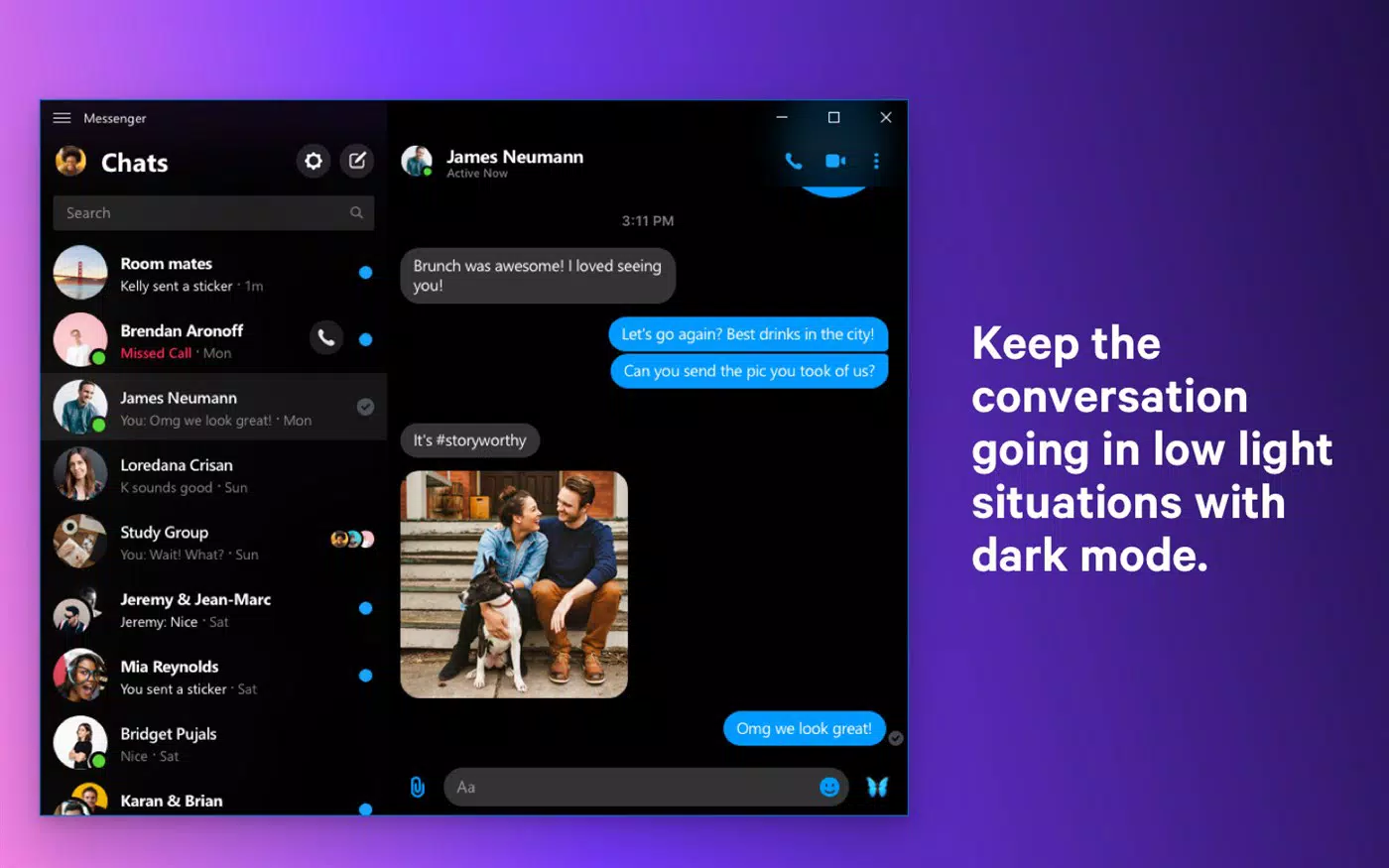
The user interface of Messenger for Desktop is clean, intuitive, and optimized for desktop use. The layout follows a standard messaging app structure with a sidebar for contact lists, a central chat area, and a bottom panel for message input and media options. This familiar design reduces the learning curve for users already accustomed to Facebook Messenger.
Navigation is straightforward, with quick access to recent conversations, groups, and settings. The app supports keyboard shortcuts for common actions, such as sending messages or opening the camera, which enhances efficiency for power users.
Although the developer did not list formal performance metrics, the app’s lightweight size of 40.8 MB suggests it operates efficiently across a range of Windows devices. It is expected to run smoothly on systems with standard hardware configurations, including older models. Responsiveness is consistent during typical use, with minimal lag when switching between chats or sending media.
Stability appears to be a strong point, as the application maintains consistent connectivity with Facebook’s servers. Users can expect reliable performance during extended sessions, including voice and video calls. The app also handles background operations well, allowing notifications to function even when the window is minimized.
Platform Compatibility & Technical Requirements
Messenger for Desktop is available exclusively for Windows. The current version is 2.3.1, and the file size is 40.8 MB. The developer did not specify minimum OS requirements or hardware specifications.
Compatibility information was not fully disclosed, so users should ensure their system meets general Windows standards for running desktop applications. The app does not appear to require elevated permissions or extensive background processes, which supports broad accessibility.
Given the absence of official system requirements, users are advised to test the application on their devices to confirm functionality. The lack of detailed technical disclosures does not detract from its usability, as the app functions as a lightweight desktop client with minimal resource demands.
Pros and Cons
- Free to download and use with no in-app purchases
- Full access to Facebook Messenger features on desktop
- Supports desktop notifications even when minimized
- Lightweight design with low system resource usage
- Seamless sync with mobile and web versions of Messenger
- Unofficial client—no official support from Facebook
- No public information about the development team
- Compatibility details not officially disclosed
- Updates may not be as frequent or transparent as official apps
- Security risks associated with third-party software may exist
FAQ
Is Messenger for Desktop safe to use?
The app is free and does not require payment. However, as an unofficial client, users should exercise caution and ensure they download it from trusted sources to avoid potential security risks.
Can I use Messenger for Desktop without a Facebook account?
No. A valid Facebook account is required to sign in and access all features of the app.
Does the app support video calls?
Yes. Messenger for Desktop supports both voice and video calls, just like the official Facebook Messenger service.
Is the app updated regularly?
While the app has a recent version (2.3.1), the update frequency and release schedule are not publicly documented.
Can I use Messenger for Desktop on Mac or Linux?
Currently, the app is only available for Windows. There is no official support for macOS or Linux systems.
Final Thoughts
Messenger for Desktop offers a focused, efficient alternative to using Facebook Messenger through a browser or mobile app. Its clean interface, real-time notifications, and full feature set make it a valuable tool for anyone who relies on constant messaging. The app’s lightweight design and seamless cross-platform sync enhance usability across devices.
While it is an unofficial client with limited transparency around updates and development, its functionality and reliability are strong. For users seeking a distraction-free messaging experience on their PC, this tool delivers significant value. It is particularly beneficial for professionals, students, and frequent communicators who prioritize speed and focus.
Download Messenger for Desktop now


